How O.M.V.M. Makes Music Videos With AI (No Hollywood Budget Needed)

A great music video does not begin with expensive cameras, a giant crew, or a Hollywood studio. It begins with a song, a point of view, and a visual world that makes people want to stay inside the story.
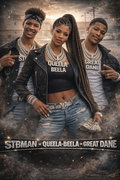
That is the idea behind O.M.V.M. : Oak Cliff’s Most Vicious MCs. Based in Dallas, Texas, O.M.V.M. creates original music, albums, characters, stories, AI-generated cinematic visuals, and connected entertainment projects. The group’s wider universe, The Standard Saga, is built around three distinct voices:
- STBMAN STBERNARD: leadership, legacy, and the rise of a new king
- QUEELA-BEELA: strength, intelligence, elegance, and self-defined standards
- GREAT DANE: raw power, fearless energy, and an untouchable mentality
If you have ever searched for how to make an AI music video, the most important lesson is this: AI is not the story. AI is part of the production process. The story, characters, music, and creative direction still have to come first.
Here is a practical workflow an independent artist can follow.
1. Start with the song, not the software
Before opening an AI video generator, listen to the song several times without thinking about visuals. Pay attention to its emotional movement.
Ask:
- What is the song really about?
- Where does the energy rise?
- Which line or moment feels most memorable?
- Does the track feel triumphant, romantic, threatening, reflective, or mysterious?
- Is the video telling a story, showing a performance, or creating a mood?
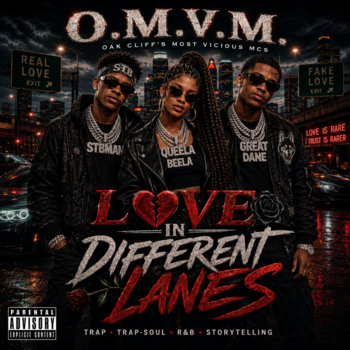
O.M.V.M.’s releases include projects such as TRAP-SOUL, LOVE IN DIFFERENT LANES, SOUL OVER STREAMS, ANOINTED IN THE TRENCHES, HALLOWEEN NIGHT, and THE STANDARD SAGA: VOL. 1.
Each project can suggest a different visual language. A song from SOUL OVER STREAMS may call for a colder, more determined atmosphere. A track connected to The Standard Saga may need larger symbols, stronger character roles, and a more cinematic sense of scale.
You do not need to visualize the entire song immediately. Start with the strongest section, such as the chorus or a memorable verse. A 15- to 30-second test can reveal whether your concept works before you build the full video.
2. Turn the song into a visual concept
A useful concept can usually be explained in one sentence.
For example:
Three original characters move through a tense city at night while each one faces a different test of power, loyalty, and identity.
That sentence gives you direction without locking you into every detail.
Next, decide what kind of video you are making:
- Performance video: the character performs directly to the camera.
- Narrative video: the visuals follow a beginning, conflict, and resolution.
- Atmospheric video: the focus is mood, movement, symbolism, and cinematic imagery.
- Hybrid video: performance shots and story scenes work together.
For O.M.V.M., a hybrid approach fits naturally because the music is connected to original characters and stories. The characters are not just performers placed into random backgrounds. They help define the world.
Write down three things before generating anything:
- The main conflict or feeling
- The location or visual world
- The role each character plays
This small amount of planning prevents the video from becoming a collection of attractive but unrelated AI clips.
3. Build a shot list before generating clips
AI works better when you generate short, focused scenes instead of asking for an entire music video in one prompt.
Break the song into sections:
- Intro
- Verse one
- Chorus
- Verse two
- Bridge or breakdown
- Final chorus
- Outro
Then assign a visual purpose to each section.
| Song section | Possible visual purpose |
|---|---|
| Intro | Establish the location, symbols, or characters |
| Verse | Show movement, conflict, or detailed storytelling |
| Chorus | Use the strongest performance or hero shots |
| Bridge | Change the mood, location, or visual perspective |
| Final chorus | Bring the characters and main idea together |
| Outro | Leave the audience with a final image or question |
A shot list might include:
- Wide shot of the city or environment
- Close-up of STBMAN STBERNARD
- Performance shot for the first chorus
- QUEELA-BEELA entering a new location
- GREAT DANE moving through a threatening setting
- Symbolic insert, such as a crown, road, sign, door, or skyline
- Group shot for the final chorus
The goal is not to generate hundreds of clips. The goal is to create enough usable shots to control the pace and give every section a purpose.
4. Keep the characters consistent
Character consistency is one of the biggest challenges in AI-generated music videos. A character may look different from one shot to the next if the visual references are not controlled.
Start with a character reference sheet for each major figure. Include:
- Face and hairstyle
- Body type and age range
- Main wardrobe
- Jewelry or signature accessories
- Color palette
- Typical facial expression
- Role in the story
Keep the core description the same every time. Change the location, camera angle, lighting, and action : but do not casually rewrite the character’s identity in every prompt.
For example, the fixed details for a character might include:
Original fictional hip-hop character, black and gold wardrobe, confident posture, dramatic expression, cinematic street setting, consistent facial features.
The changing details might include:
Walking through rain, standing beneath a streetlight, looking across a rooftop, performing toward the camera.
Use the same reference images whenever the generation system allows it. Create a small library of close-ups, medium shots, and full-body images. This gives the AI a stronger visual foundation.
For O.M.V.M., consistency is especially important because STBMAN STBERNARD, QUEELA-BEELA, and GREAT DANE each represent a different part of the universe. Their identities should remain recognizable even when the setting changes.
5. Generate short clips with clear motion
A strong image is not automatically a strong video. When generating motion, describe one primary action at a time.
Instead of writing:
The character runs, fights, dances, performs, turns into smoke, and walks through a futuristic city.
Try:
Slow camera push toward the character as the coat moves in the wind. Neon signs flicker in the background. The character looks directly into the camera.
Simple prompts give you more control. Generate several versions of important shots and choose the one with the best movement, expression, and framing.
Short clips are also easier to edit. A few seconds of controlled motion can be repeated, trimmed, reversed, or placed between performance shots. You can build a cinematic sequence from small pieces instead of hoping one long generation stays consistent from beginning to end.
When creating an AI-generated music video, think like an editor. Ask whether each clip gives you a clean beginning and ending. If a clip starts with a strange pose or ends with a distorted face, it may be difficult to use even if the middle looks good.
6. Sync visuals to the beat and mood
Beat synchronization is more than cutting every clip on every drum hit. The visual rhythm should match the emotional rhythm of the song.
Place the audio on your editing timeline first. Then mark:
- Major downbeats
- Snare hits
- Chorus entrances
- Beat drops
- Repeated hooks
- Dramatic pauses
- Important lyrical moments
Use faster cuts when the song feels aggressive or energetic. Let shots breathe when the song becomes reflective or emotional.
A useful pattern for cinematic hip-hop visuals is:
- Verses: storytelling, close-ups, movement, and character details
- Choruses: bold performance shots and memorable group images
- Instrumentals: atmosphere, locations, symbols, and transitions
- Final section: the strongest visual payoff
You do not need every cut to land perfectly on a beat. Sometimes holding a shot over a sustained note creates more power than cutting rapidly. The goal is to make the viewer feel that the music and image belong together.
Tools that analyze rhythm, lyrics, or song structure can help create a starting point. However, the final timing still benefits from human judgment. Automatic sync can identify patterns, but it does not know which image best supports the meaning of a lyric.
7. Edit, grade, and make the world feel unified
AI-generated clips often come from different generations, so they may have slightly different lighting, color, or texture. Editing is where you make them feel like one film.
Start by choosing a visual palette. O.M.V.M.’s existing imagery often leans toward gritty, dramatic, urban, and cinematic energy. You might build your own palette around:
- Gold and black for power and legacy
- Blue and silver for isolation or reflection
- Red for danger and conflict
- Deep shadows for mystery
- Warm streetlight tones for realism
Apply consistent color treatment across the clips. Adjust brightness, contrast, saturation, and temperature so one shot does not feel disconnected from the next.
Keep transitions intentional. A hard cut can make a beat feel stronger. A dissolve can create a dreamlike shift. A match cut : such as moving from a spinning wheel to a city light : can connect two different scenes through motion or shape.
Add lyrics or subtitles only when they improve the experience. Text should support the song, not cover the most important part of the frame.
Export the main version first, then create shorter formats for social platforms. A horizontal master can be reframed into vertical clips for Instagram Reels, Shorts, and other mobile placements. Select moments that work on their own:
- The strongest visual entrance
- A memorable hook
- A character introduction
- A dramatic transition
- A short behind-the-scenes explanation

8. Publish the video as part of a larger story
An AI music video should not be treated as a one-time upload. It can become part of a larger release world.
Along with the full video, consider sharing:
- A short teaser
- Character portraits
- A lyric clip
- A scene breakdown
- A before-and-after visual comparison
- A follow-up story connected to the song
This is where O.M.V.M.’s connected-universe approach becomes useful. The music, characters, visuals, and stories can point toward one another. The official description for THE STANDARD SAGA: VOL. 1 explains that its songs connect to characters, stories, and visuals, with support helping fund future AI music videos, behind-the-scenes episodes, and story expansions. Those are planned expansions, but the creative principle is already clear: each release can open the door to the next part of the world.
The best answer to how to make an AI music video is not “find the most powerful generator.” It is to build a repeatable creative process:
- Start with the song.
- Define the story and characters.
- Plan the shots.
- Lock character references.
- Generate short, focused clips.
- Sync the visuals to the music.
- Edit and unify the look.
- Publish the video as part of a larger creative world.
You do not need a Hollywood budget to make something ambitious. You need a clear idea, consistent characters, patience during generation, and the willingness to make creative decisions at every stage.
Watch O.M.V.M.’s AI music videos and explore the music on Bandcamp. Then follow O.M.V.M. on Instagram to see what comes next.